


An AI coding tool can give you a working app in seconds. Getting the app you meant is harder: in the 2025 Stack Overflow Developer Survey, 66% of developers named “AI solutions that are almost right, but not quite” as their biggest frustration. I hit that wall with a small expense tracker, then built it again using BMAD (Breakthrough Method of Agile AI-driven Development), a framework that brings structure to agentic coding by making you answer the questions a vague prompt skips.
What happens when you build an app from one prompt?
You get a working app fast, and it is often not the app you meant. The AI fills each gap in a short prompt with a reasonable default, and you only find those defaults by using the result.
At university I wanted a personal expense tracker for my phone, with quick logging, categories and a monthly budget warning. My prompt was:
"I want a simple website to track my expenses. A person adds an expense with the amount and what it was for, and the site saves it and keeps a record of everything. There should be a dashboard that shows how much I spend and where my money goes, using graphs."
I had a working app in one HTML file within seconds. On my phone, the layout was made for a desktop, I could not edit or delete a wrong entry, and there was no budget or warning, the whole reason I wanted the app.
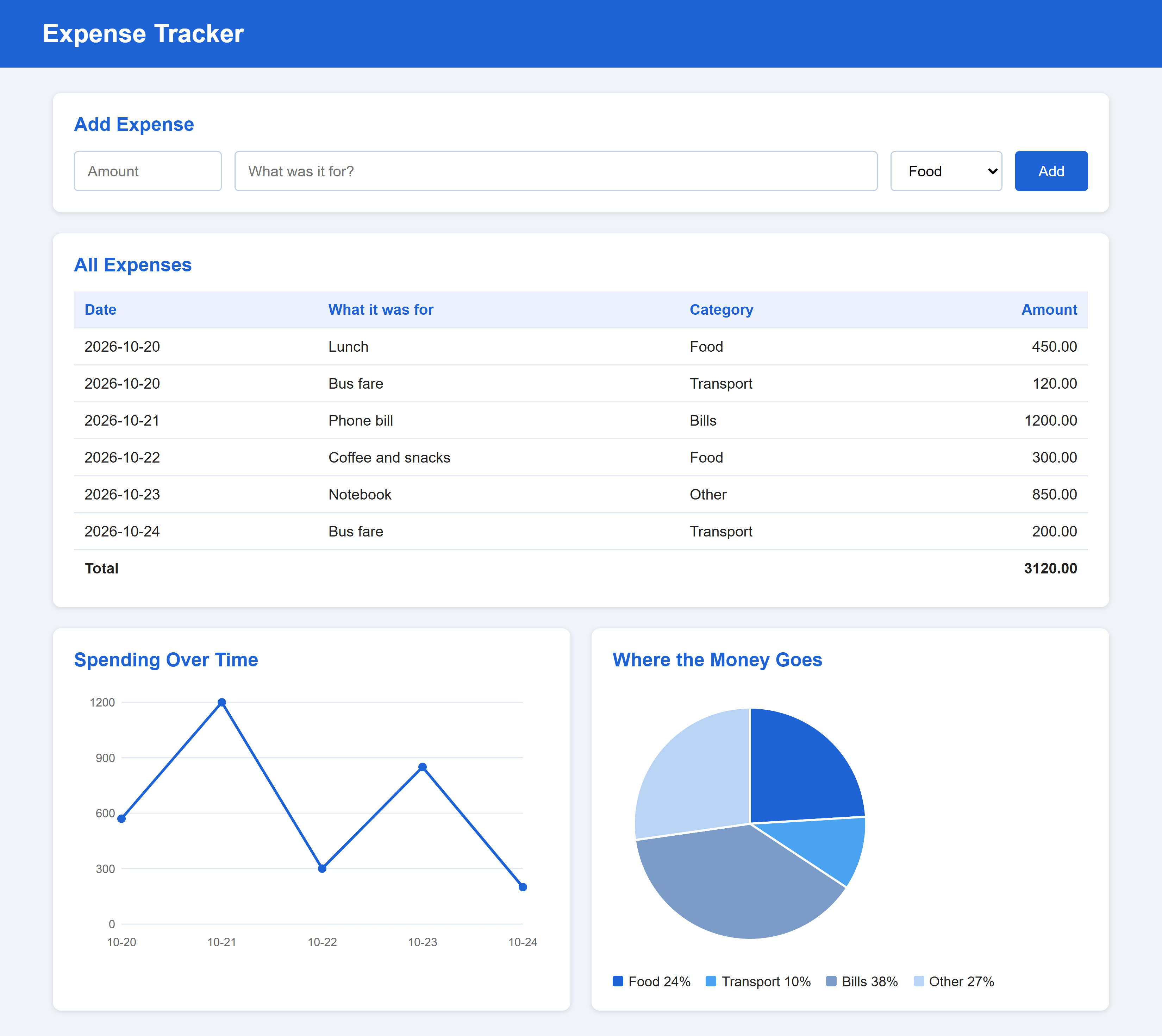
Why did the AI miss so much?
Mostly because my prompt carried a summary of my idea, not the idea itself. The AI filled each gap with a reasonable default, and a single paragraph does not show you what is missing.
It even added a category list I never asked for (Food, Transport, Bills, Other), because the prompt said nothing about my own categories. A more detailed prompt would probably have got more right, but not everything, because AI tools still make mistakes. Here, most of the gaps started with me. Five things were clear in my head and missing from my prompt:
| In my head | In my prompt |
| A phone app, with logging in a few taps | Not mentioned |
| Fixed categories: food, transport, data, books, going out | Only “what it was for” |
| A monthly budget with a warning near the limit | Not mentioned |
| Editing and deleting wrong entries | Only “keeps a record” |
| Data stays on my phone, with no login | Not mentioned |
The real problem was that I could not see these gaps. I found each one only after the app exposed it, and rereading my prompt would not have shown them to me.
What is BMAD, and how does it structure agentic coding?
BMAD is an open-source framework you install into a project and run inside an agentic coding tool such as Claude Code. Your idea moves through focused stages instead of one long chat, and each stage talks with you, writes a document and passes it on.
Its main terms:
- Brief: the idea in short: problem, audience, and what is in and out.
- PRD (product requirements document): what the app must do, as numbered requirements.
- Epic: a large piece of user value, such as “back up and restore my data”.
- Story: a small part of an epic, with acceptance criteria that say when it is done.
In short: brief it, plan it, build it, review it.e on judgment. Teams adopting AI in delivery can start with Verdentra’s AI and cognitive solutions practice.
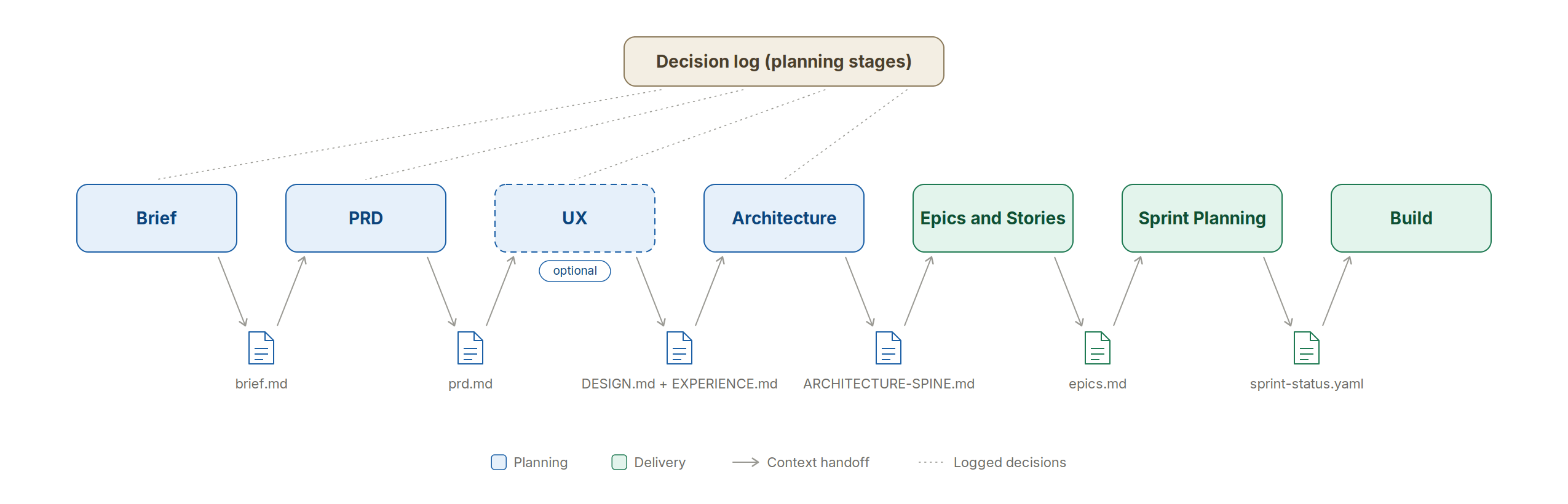
Each stage has a command, and /bmad-help says which to run next. At the time of writing (November 2026), I used v6.12, the stable release. v7 is in preview and changes the install steps and some commands, so check the official documentation for your version.
What does a structured AI coding workflow look like on a real app?
A structured AI coding workflow puts the written plan first and the code second. With BMAD, I built the same tracker again, and every planning stage asked questions and recorded my decisions before any code existed.
I chose Coaching mode at every planning stage, where BMAD works through each section with you and pushes back on thin answers. It started by asking, not building. I described my idea, and instead of writing code, BMAD began asking questions. Here are some of them, with the decisions I made:
| Question BMAD raised | What I decided |
| Which “month” should the budget use? | Payday to payday, with payday as a setting |
| What does “a few taps” actually mean? | Open the app, type the amount, tap a category: three actions, under five seconds |
| Should tapping a category save straight away? | Yes, with Undo for about five seconds |
| If data stays only on the phone, what happens when I lose the phone? | A manual backup and restore, even though I had said “no export” |
| How does a budget warning appear without a server? | Inside the app: a yellow banner from 80%, red when over budget |
| How will you know the app is working for you? | No spending goes unlogged, and logging takes under five seconds, timed at the bus stop |
Did I think about any of these when I wrote my first prompt? Not one. Each question uncovered something that was clear in my head but missing from my prompt, and each answer went into a document the next stage could read.
What did the process catch before and during the build?
It caught problems in documents instead of in the running app, though not every problem could be predicted.
What no document predicted: on my Samsung Galaxy A56, the backup file could not be saved to the phone. /bmad-correct-course updated the plan before the build continued.
Architecture review: Undo could erase a budget change, two open windows could silently overwrite each other’s data, and Android’s share sheet can refuse .json files, so backups became .txt files.
Readiness check: planning ended with 29 functional requirements, 29 architecture decisions and 23 stories with 324 acceptance criteria. The check returned CONCERNS twice, and each concern was fixed before any code existed.
Build and review: all 23 stories went through spec, implement, review, fix and test. A final code review found one serious bug, a Settings change lost when switching tabs, and the app now has more than 1,200 automated tests.
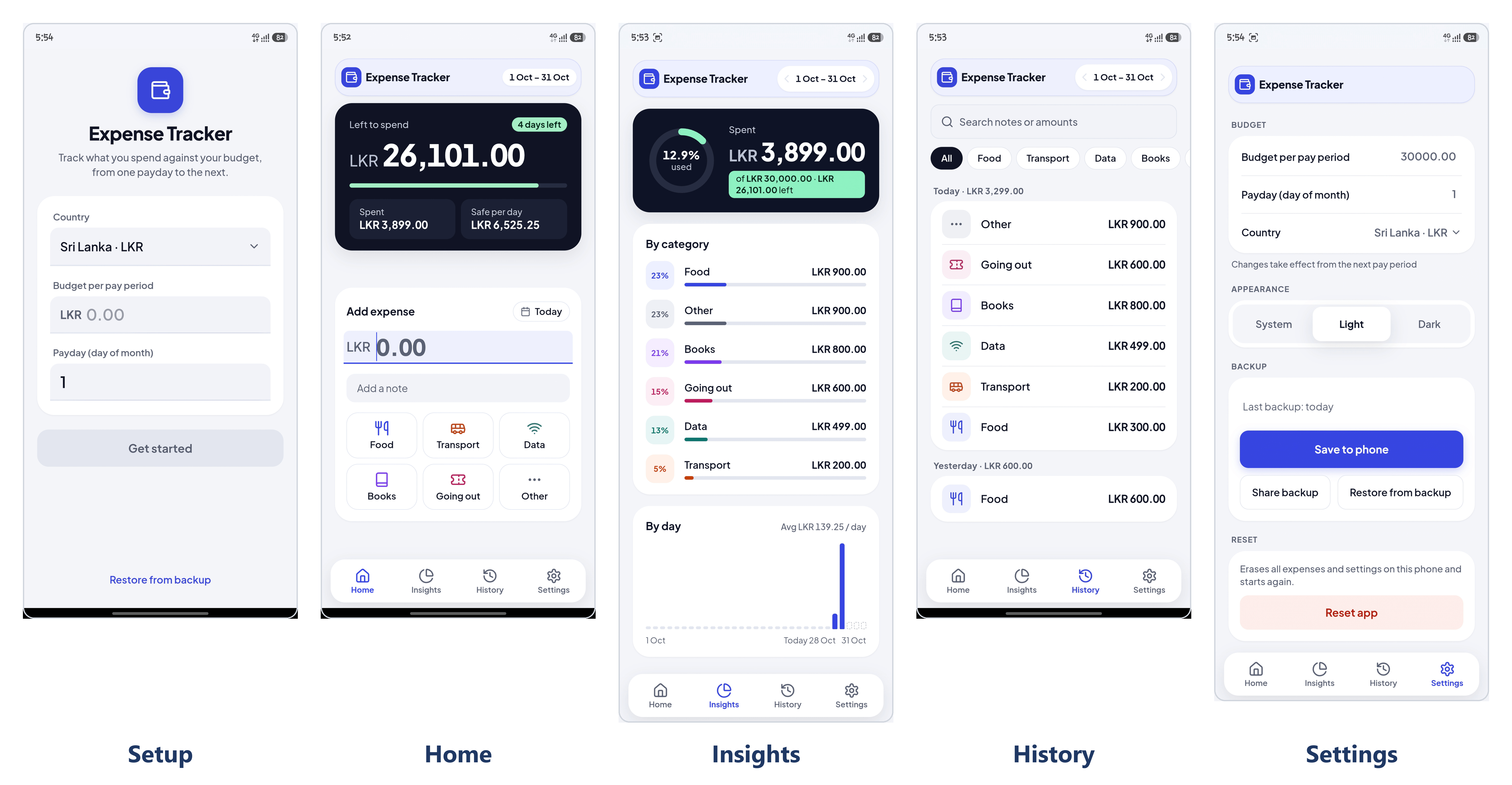
You can try it yourself at expense-tracker-seenu.pages.dev
Is BMAD worth the effort?
Sometimes. It costs time and tokens, it suits real projects better than small fixes, and it does not remove mistakes.
It does not remove mistakes. The AI still wrote a bug that the code review had to catch, and my phone found a problem no document predicted. You still need to read what it produces and test it yourself.
It takes time and tokens. Planning took me about a day and a half and more than 300 logged decisions before any code was written. At one point I stopped because of the time and tokens it was using and came back to it later.
It can be too much for small work. A one-line fix does not need a brief, a PRD and an architecture review, and the vocabulary takes time to learn.
The more powerful the brush becomes, the more it matters who holds it.
How do you start with BMAD?
Install the prerequisites, run the installer in a new project, then let the framework tell you what to run next. Choose a real idea, since the questions only help when there are real decisions behind them.
- Install Node.js 20.12 or later, Python 3.10 or later and uv, then run npx bmad-method install in a new project. The install guide has the details.
- Open the project in your AI coding tool and run /bmad-help to see what to do next.
- Pick a real idea, not a toy, and answer the questions slowly.
The first session may feel slow. That is the point: every question is a decision you would otherwise leave to the AI.
I recommend the BMad Code YouTube channel too. It goes much deeper than this article.
Decide before the AI has to guess
My first expense tracker took seconds. The second took about a day and a half of planning, but it is the app I wanted: it logs an expense in three actions, follows my payday and warns me before I run out.
BMAD did not make the AI perfect. It made me decide things before the AI had to guess, and it wrote each decision down where the next stage could read it. My effort moved from fixing surprises after the build to answering questions before it.
Before your next round of agentic coding, ask how many decisions are still only in your head. If the answer is “quite a few”, stop prompting and start briefing.