


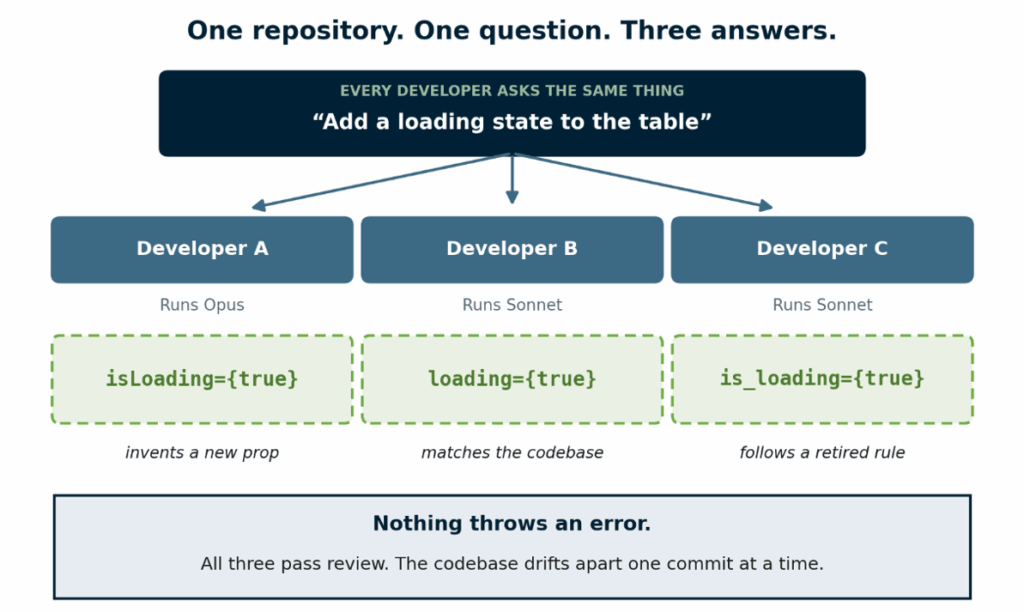
Ask three developers on your team to have their coding agent make the same change to the same repository. Do the three results match? Most teams doing AI-assisted engineering have never checked. There is no reason to, because context management in multi-agent development looks fine from the inside. Everyone’s agent produces something that compiles, passes review, and ships without incident, so the question never comes up. But the results are rarely identical. One developer’s agent writes a prop name the codebase stopped using months ago. Another quietly builds a helper that already exists three folders away. A third does it correctly, for reasons nobody can reconstruct.
None of it fails. That is the problem. Here is what it usually looks like.
Is your team already running a multi-agent system?
Most likely, yes. When people say multi-agent, they picture one developer running several agents on one task. The more common situation is the opposite: several developers, each running one agent, on one codebase.
The agents belong to different people. They hold different context, never compare notes, and nothing coordinates them.
Agent context is not a personal setting. It is something the whole team depends on, and most teams still treat it like a private preference. That is why one repository can produce three different answers to the same question. single response cycle, combining context from Figma, your codebase, and your component library simultaneously.
What actually goes wrong when agents share a repository?
Most of what shapes an agent’s answer is invisible to everyone else on the team.
It is easy to blame this on people using different tools. But it happens even when everyone on the team uses Claude Code on the same repository:
- Personal instruction files. A developer can keep their own rules in ~/.claude/CLAUDE.md, which applies to every project they open. Nobody else can see it, so nobody knows it is shaping the output.
- Personal agents. Agents saved in ~/.claude/agents/ belong to one person. If a teammate has an agent with the same name, the two behave differently and neither developer knows.
- Different models. One developer runs Opus, another runs Sonnet. Give them the same vague instruction and they will not read it the same way.
- Different connected tools. An agent with three MCP servers connected can look things up that an agent with none simply cannot.
And the shared file drifts on its own. Conventions change, folders move, and the instructions keep pointing at a structure that no longer exists.
Do shared context files in a team repository fix the problem?
No, not on their own. The obvious fix is to write everything down in shared context files in a team repository. Past a point, that makes the output worse, not better.
Researchers at ETH Zurich tested shared context files across several coding agents. Providing them did not generally improve task success, while raising inference cost by over twenty percent on average. Files generated automatically by a model performed worst of all.
The reason is simple. Agents follow what they are given, so a file describing the architecture makes them go and check it: reading more files, running more checks, taking more steps to reach the same result. The study found that architecture overviews, despite being widely recommended, are not helpful. On a team it compounds, because instructions pile up. Everyone adds and nobody deletes, so old rules the team stopped following sit beside the ones that replaced them. The agent quietly follows one of the two and gives no sign that it chose.
What does good context management in multi-agent development look like?
Smaller than most teams expect. Only what the agent cannot work out by reading the code.
A useful CLAUDE.md is closer to this than to an architecture document:
# Project context

## Commands
Build: npm run build
Test one file: npm test -- <path>
Lint must pass before commit: npm run lint

## Conventions
Async state prop is `loading`, never `isLoading`
Imports use the `@ui/` alias, not relative paths
Format dates with formatDate(), not toLocaleDateString()

## Do not touch
src/legacy/ is frozen. Raise a ticket instead of editing it.
Thirteen lines, and the rule about loading is the one that would have prevented the split in the diagram at the top of this article. Writing the file is the easy part. Three things keep it useful:
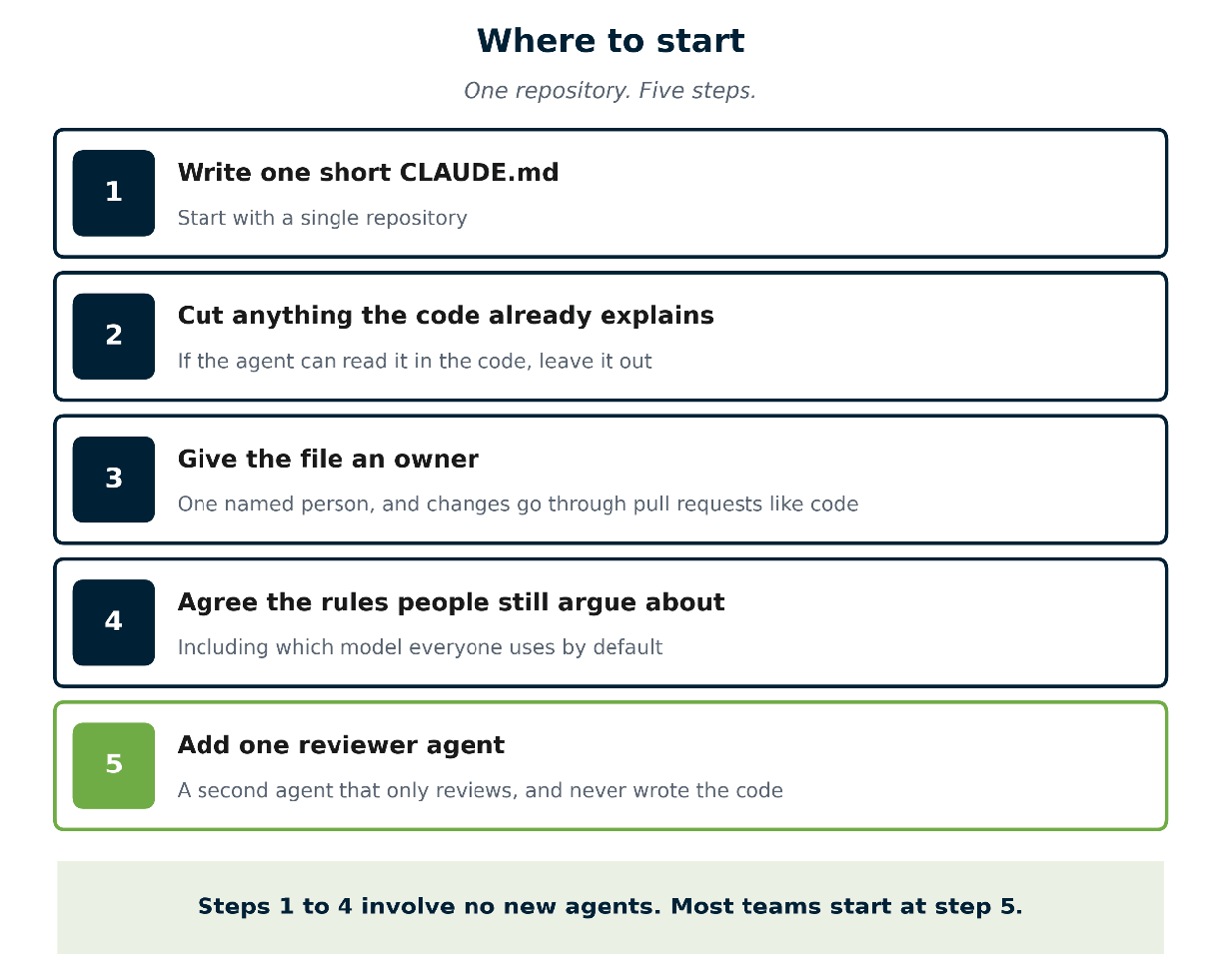
- One file, one owner. Commit it to the repository and make one person responsible for it. Changes to it go through pull request review, like code.
- Delete more than you add. If the codebase already makes something obvious, leave it out.
- Settle it with people first. Agents amplify inconsistency that already exists. A rule the team still argues about is not ready to be written down.
Two habits look productive and are not. Connecting every available MCP server sounds thorough, but each connected tool takes up part of the agent’s working memory on every request. And documenting your whole architecture in one file is what the study tested. It did not help.
Where should a team start?
Not everywhere at once. Start with one repository and a change small enough that nobody needs convincing.
Doing it everywhere at once is a big ask, it competes with deadlines, and it gives you no way to tell whether it worked. A narrow start produces something visible, and that argues for the next step better than any proposal.
Less context, owned by someone
The teams getting real value from agents are not the ones with the most complicated setups. They are the ones whose context is short, current, owned by one person, and reviewed like code.
Good context management in multi-agent development is simpler than most teams expect. More context costs more and delivers less. Adding is rarely the fix.
Get it right and three developers asking the same question finally get the same answer.