


AI coding assistants have become capable at writing components that look plausible. What they consistently struggle with is writing components that actually belong in an existing product, ones that follow your team’s naming conventions, reuse the button you already built, and use the spacing.md token rather than a hardcoded 16px margin. That gap isn’t a model capability problem. It’s a context problem.
MCP for frontend development is the mechanism that closes it.
What is MCP for frontend development?
MCP is an open standard that defines a consistent interface for AI models to connect to external tools and data sources. Instead of a one-off integration for every tool, any MCP-compatible client can talk to any MCP-compatible server using the same JSON-RPC 2.0 transport.
Each MCP server exposes two primitives:
- Resources – read-only data like files, components, or design tokens
- Tools – callable functions that query, search, or fetch
The AI decides when to call them based on the task, and can query multiple servers in a single response cycle, combining context from Figma, your codebase, and your component library simultaneously.
What’s actually wrong with the design-to-code workflow?
| Step | Without MCP | With MCP |
| 1 | Developer screenshots Figma or pastes a link | AI queries Figma server for exact layer and token data |
| 2 | AI estimates spacing and color from pixels | AI queries codebase server for existing component implementations |
| 3 | AI guesses component names, often inventing duplicates | AI queries design system server for documented variants and props |
| 4 | Developer manually corrects values and refs | Code generated using actual tokens and existing components |
| 5 | Review catches design drift; cycle repeats | Developer reviews a first pass grounded in real project context |
The structural difference: without MCP, the AI fills gaps with pattern-matching from training data. With it, the AI fills gaps by querying the project directly.
How does the Figma MCP server work?
The Figma MCP server exposes the file’s internal data model, not its rendered output. When queried, it returns:
| Data type | What the AI gets |
| Design tokens | Exact hex, rem, and spacing values as defined in the file |
| Layer names | Component and variant names as the design team defined them |
| Component metadata | Instances, overrides, props, and main component references |
| Auto-layout properties | Direction, gap, padding, and alignment as configured |
| Style definitions | Text styles, color styles, effect styles with exact values |
A data table component with 12px vertical padding and a Body/Small text style: with a screenshot, an AI might generate padding: 14px and font-size: 13px. With the Figma MCP server, it reads the exact values, and knows to look up Body/Small in the design system for the corresponding code token.
Why do design tokens matter so much here?
Design tokens are the bridge between design intent and code. When an MCP server exposes this token layer, the AI generates code using var(–color-surface-default) rather than #ffffff, which means theming, dark mode, and future design updates all work without touching the generated code.
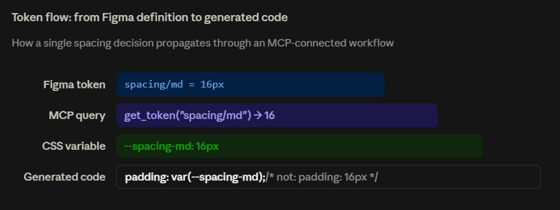
Hardcoded values break on theme changes. Token references don’t.
How does the codebase MCP server expose your components?
| Capability | Frontend use case |
| File system access | Finding where components live (src/components/, packages/ui/) |
| Symbol search | Checking whether DataTable exists before generating a new one |
| AST-level inspection | Reading a component’s prop interface before deciding to reuse or extend it |
| Config awareness | Reading tsconfig.json to generate correct path aliases (@ui/Button vs ../../components/Button) |
| Semantic search | Finding “the component that handles loading states for tables” without knowing its filename |
This is the mechanism that prevents the most common AI-generated code problem: duplicate implementations. Without codebase access, an AI generates a new LoadingSpinner because it doesn’t know one exists. With it, it finds src/components/Spinner/index.tsx, reads the prop interface, and uses it.
What happens when you chain multiple MCP servers?
The real leverage comes from using servers in combination. A single query cycle might look like:
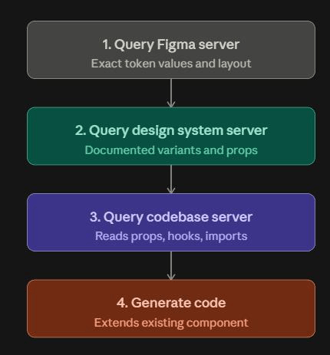
The model isn’t just autocompleting, it’s running a small investigation before it writes anything.
Where does MCP actually get used?
- Figma-to-code generation – AI reads actual token values, auto-layout gaps, and component instances from the file. Produces markup that uses real CSS variables and spacing tokens.
- Design system integration – Before generating a button, the AI checks what variants already exist, size, variant, disabled, loading, and uses them rather than inventing a parallel API.
- Component reuse detection – The codebase server lets the AI search for existing implementations first. Reduces the drift that accumulates when a team ends up with three slightly different Modal components.
- AI-assisted test generation – Test cases generated from a component’s documented states and variants. A component with loading, error, and empty states gets tests that actually cover all three.
What does the difference look like in practice?
Task: implement a data table with a loading skeleton state, matching a Figma design.
| Decision point | Without MCP | With MCP |
| Spacing values | Estimated: padding: 14px 16px | Token: var(–table-cell-padding) |
| Row border color | Guessed: #e5e5e5 | Token: var(–color-border-subtle) |
| Loading state | Generates a new inline skeleton component | Finds SkeletonRow in src/components/Skeleton/, imports it |
| Sort icon | Installs a new icon library | Uses ChevronIcon already in the codebase |
| Import paths | Uses relative imports, ignores path aliases | Reads tsconfig.json, generates @ui/DataTable correctly |
| Prop naming | Invents isLoading, project uses loading | Reads existing component API, uses loading to match |
How do you actually set this up?
Connecting an MCP server requires a configuration step in your AI client. A typical mcp.json:
{
  "mcpServers": {
    "figma": {
      "command": "npx",
      "args": ["-y", "@figma/mcp"],
      "env": { "FIGMA_API_TOKEN": "your-token" }
    },
    "codebase": {
      "command": "npx",
      "args": ["-y", "@modelcontextprotocol/server-filesystem", "./src"]
    }
  }
}
Each server runs as a local process and communicates over stdio. Multiple servers run in parallel, so a query needing both Figma and codebase context doesn’t have to wait.
What are the benefits, and where are the real limits?
What improves:
- Token accuracy, real values, not estimates
- Component reuse, finds what already exists
- Import correctness, reads your tsconfig
- API consistency, matches your prop naming
- Test coverage, uses documented states
What doesn’t change:
- Code review is still mandatory before anything ships
- A messy design system gives the AI messy context
- MCP doesn’t verify accessibility or performance
- Undocumented components are invisible to it
- Architectural judgment still requires a developer
MCP reflects the quality of what it's connected to. An undocumented design system gives the AI undocumented context. MCP is an amplifier, not a corrective.
How does the developer’s role actually shift?
The shift isn’t in scope, it’s in where time goes. Less time on mechanical translation work (hunting token values, correcting import paths, searching for existing components). More time on component API design, architecture decisions, and reviewing output that’s now close enough to production that the differences actually matter.
Someone still has to decide whether a component’s API is right, whether reuse makes sense in context, and whether the output holds up across edge cases. Those decisions don’t come from a design file.
The real upgrade is context, not speed
MCP is best understood as a context upgrade rather than a speed upgrade. The model is the same. What changed is the information it has access to when it writes, and that changes the character of the output more than the pace of it.
Teams with well-maintained design systems and clean codebases will see the largest gains. Teams starting from inconsistent foundations, the kind a technology assessment would surface anyway, will see MCP reflect those inconsistencies back at them, which is useful information, just not the kind anyone wants. That’s the real case for MCP for frontend development, not speed, but context.